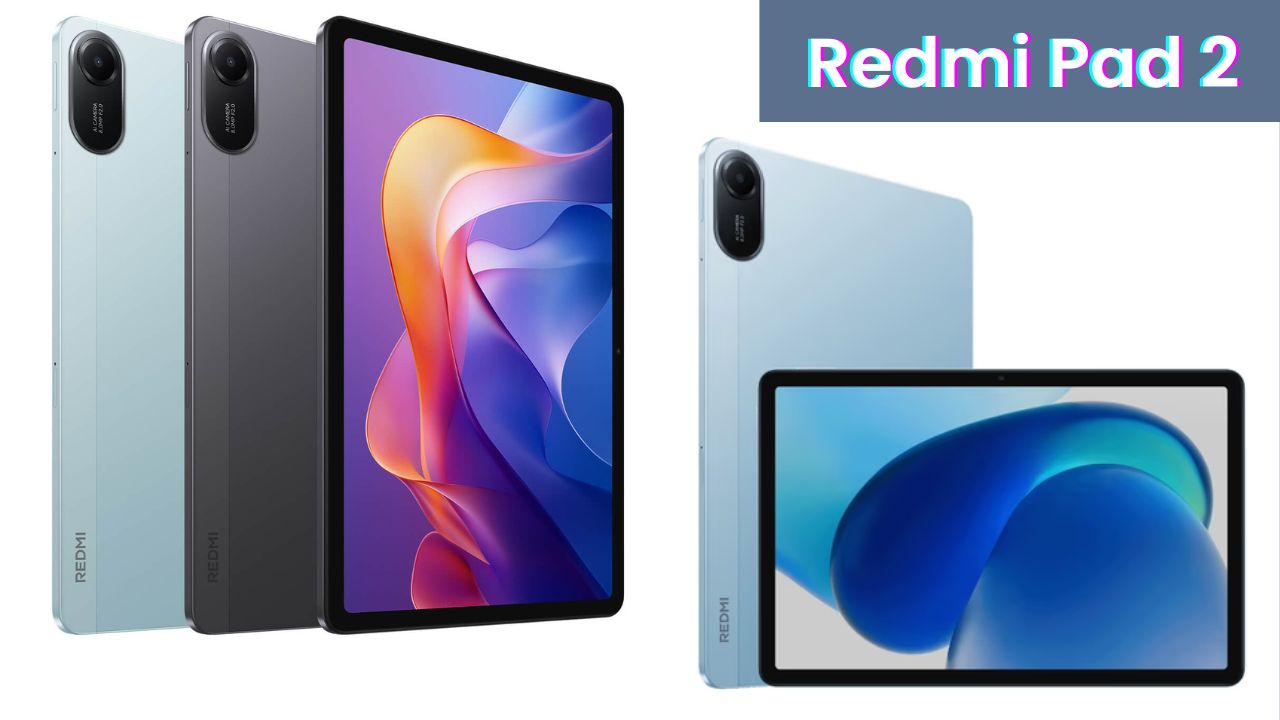
Just two days back, Redmi launched its brand-new Redmi Pad 2, and honestly, I couldn’t stop myself from ordering it right away. The tablet arrived from Flipkart in a neat box, and after using it for around 48 hours, I’m ready to share what I really felt about it.
Now, this is not one of those robotic “spec sheet” reviews. I’ve actually used it — watched movies, did some gaming, tested the camera, and even tried note-taking with a stylus. So, if you’re planning to buy the Redmi Pad 2 Wi-Fi + Cellular model, this blog will give you the full picture from a real user’s point of view.
First Impressions and Unboxing
When you first open the box, you’re greeted with the tablet itself — and man, it looks beautiful. The design feels premium even though it’s made mostly of fiber. It has a nice matte finish with a slightly bluish tone, and the dual-tone back adds a stylish touch.
Inside the box, you get an 18W charger, a USB Type-C cable, a SIM ejector tool, and some manuals that, honestly, most of us never read.
The tablet feels very light in hand — around 545 grams — and you can easily carry it in your backpack or even hold it for long study sessions. Despite being light, it doesn’t feel cheap. The body feels sturdy, and the finishing is quite clean.
You get four speakers (two on top and two at the bottom) with Dolby Atmos support, a Type-C charging port, and even a 3.5mm headphone jack, which is rare these days. There’s also a SIM tray that can take a nano SIM and a microSD card — so you can use 4G data directly without depending on Wi-Fi.
Display: Big, Bright, and Colorful
The Redmi Pad 2 comes with a large 11-inch WQXGA IPS LCD display (2560×1600 resolution) and supports a 90Hz refresh rate. You can switch between 60Hz and 90Hz depending on your battery preference.
The display brightness peaks at 600 nits, which is decent enough for indoor use and okay outdoors unless you’re under very harsh sunlight. The colors look rich, and blacks are deeper than expected in this price range. Watching movies or YouTube videos feels really nice — the screen feels smooth, and even casual editing in apps like Lightroom or CapCut works fine.
Also, it’s a wet-touch display, meaning even if a few drops of water fall on it (like during monsoon travel or sweaty hands), the screen still works properly.
Stylus & Note-Taking Experience
Many people asked if it supports a stylus — yes, it does! I tried it with a third-party stylus worth around ₹1000, and it worked fine for normal note-taking and doodling. The only drawback is no palm rejection support for cheap styluses. But if you use Xiaomi’s official pen, you’ll get full palm rejection and smooth handwriting.
There’s even a “Notes” app and a “Kids Coloring” mode, where children can draw freely. I found it quite handy for making quick notes or sketching thumbnails for videos.
UI & Software Experience
Out of the box, Redmi Pad 2 runs on Android 15 (based on HyperOS 2.0). The experience feels clean, and thankfully, there’s no bloatware. No unnecessary pre-installed apps — just pure Android feel.
App opening and closing animations are smooth, although I did notice a slight lag sometimes while switching between heavy apps. I think this will improve with future updates. The tablet also supports features like:
- Floating windows for multitasking
- Split-screen mode to use two apps together
- Circle to Search (like Samsung’s flagship phones)
- AI captioning for videos
These small additions make it feel smarter and more user-friendly.
Performance & Processor
Under the hood, it’s powered by the MediaTek Helio G100 Ultra processor paired with 6GB RAM and 128GB storage (UFS 2.2). The performance is smooth for day-to-day use — browsing, Netflix, YouTube, online classes, and even some light video editing works great.
To give you a quick glance at the main hardware specs, here’s a simple table:
| Feature | Specification |
| Display | 11-inch WQXGA (2560×1600) IPS LCD, 90Hz |
| Processor | MediaTek Helio G100 Ultra |
| RAM | 6GB |
| Storage (ROM) | 128GB (expandable up to 2TB) |
| Rear Camera | 8MP AI Camera (f/2.0) |
| Front Camera | 5MP |
| Battery | 9000mAh with 18W charging |
| Operating System | Android 15 with HyperOS 2.0 |
| Speakers | Quad speakers with Dolby Atmos |
| Connectivity | Wi-Fi + 4G LTE, Bluetooth, 3.5mm jack |
You can also choose other variants — 4GB and 8GB models are available.
For light gaming, I tested BGMI on smooth + high graphics settings. It ran fine without frame drops. Once you move to HD mode, though, you’ll notice a slight lag. After 2-3 hours of gaming, it gets mildly warm, but not uncomfortably so.
For students or office users, it runs all essential apps like Microsoft Teams, Zoom, Canva, Google Docs, and even code editors smoothly. If you’re into basic content creation or studying online, this tablet fits perfectly.
Camera: Decent for Its Price
Cameras aren’t the main selling point for tablets, but Redmi has done a fair job here. You get an 8MP rear camera and a 5MP front camera. Both can record 1080p 30fps videos.
Daylight photos look fine, with good colors and decent sharpness. Indoors or low-light photos tend to get a bit grainy. The front camera works okay for video calls or online meetings but tends to overexpose when there’s a light source behind you.
So, for video calls, online classes, or scanning documents — it’s more than enough. Just don’t expect flagship-level photos.
Battery Life: Long-Lasting Performance
Now, this is where the Redmi Pad 2 really shines. You get a massive 9000mAh battery, which easily lasts a full day — sometimes more.
I watched YouTube, played games, and attended a few meetings, and still got around 12 to 13 hours of backup. Redmi claims up to 19 hours, but realistically, you’ll get around 13-14 hours depending on usage.
Charging from 0 to 100% takes about 2 hours 15 minutes with the 18W charger, which is decent for this capacity.
For students attending classes or binge-watchers on OTT, this battery backup is a big win.
Audio Quality: Truly Impressive
The quad-speaker setup with Dolby Atmos is something I didn’t expect at this price. Whether it’s watching movies, gaming, or listening to songs, the audio feels loud and clear.
If you hold it horizontally, the sound spreads evenly, giving a surround feel. For online lectures or Netflix marathons, you don’t even need earphones unless you’re in a noisy environment.
Final Verdict: Should You Buy Redmi Pad 2?
After using it for a couple of days, I can confidently say that the Redmi Pad 2 Wi-Fi + Cellular version is a complete value-for-money device.
At around 15,000 on Flipkart, you get a solid display, great battery, good speakers, and reliable performance for studies, work, or entertainment. The clean UI and Android 15 support make it future-ready too.
If you’re a student, office user, or just need a secondary device for watching, reading, and note-taking, this tablet will make you happy.
Yes, the camera could’ve been a bit better, and the stylus palm rejection issue is minor, but apart from that — it’s a solid buy in the budget category.
My Final Words
Redmi has really nailed the balance between price and performance with this one. It’s not a powerhouse like the OnePlus Pad Go, but it offers an experience that feels premium for the price. If you want a reliable, stylish, and feature-packed tablet for everyday use, the Redmi Pad 2 should definitely be on your list.