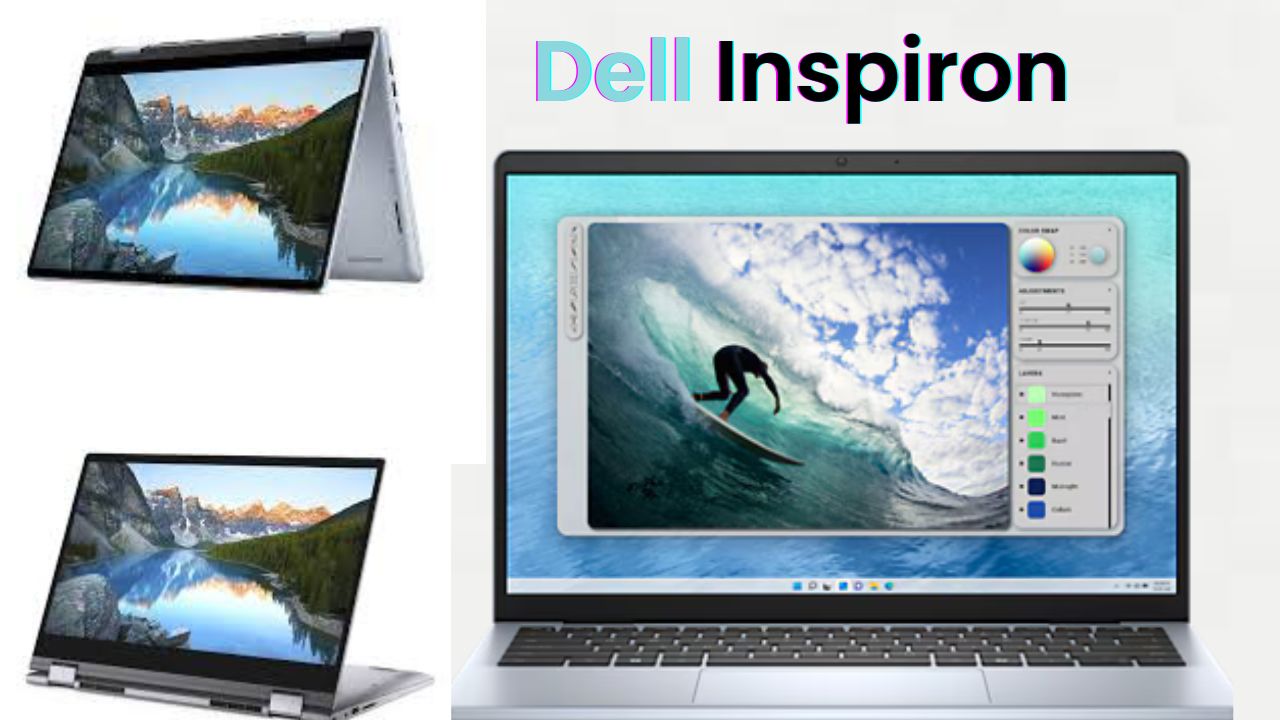
If you’ve ever wished your laptop could also turn into a tablet, then the Dell Inspiron 14 2-in-1 might just be your dream device. I recently got my hands on this hybrid laptop, and after using it for a while, I can confidently say that Dell has managed to create something genuinely useful for both students and working professionals in India.
It’s not one of those fancy, overhyped devices that look good only on paper. This one actually delivers where it matters — performance, flexibility, and overall comfort. Whether you’re binge-watching a series, attending online meetings, writing assignments, or sketching digitally, it fits all use cases quite smoothly.
Let’s talk about what makes it special and whether it’s really worth your money.
First Impressions: Compact, Clean, and Convertible
The first thing you’ll notice about the Dell Inspiron 14 2-in-1 is its sleek and compact design. It’s neither too bulky nor ultra-light — just the right size to carry around in your backpack. Weighing around 1.58 kg, it feels sturdy yet portable.
The build quality is solid, with a premium matte finish that doesn’t catch fingerprints easily. The hinge design is smooth, allowing full 360-degree rotation. That means you can use it like a regular laptop, fold it into tent mode for Netflix sessions, or flip it completely into tablet mode when you’re reading or sketching.
And yes, Dell even includes a stylus inside the box — not many brands do that anymore. The stylus feels premium and works well for quick notes, doodling, or even digital painting.
Ports, Connectivity & Design Details
Dell hasn’t cut corners when it comes to connectivity. On the left, you get two USB Type-C ports (with Thunderbolt support), one HDMI port, and a charging port. On the right side, you’ll find a USB Type-A port, an SD card reader, and a 3.5mm audio jack.
So whether you’re connecting a pen drive, a monitor, or external storage, you’re pretty much covered. The laptop also supports Wi-Fi 6E and Bluetooth 5.0, which means better stability and faster data transfers. The overall layout feels well-thought-out — practical, not flashy.
Display and Sound: Made for Everyday Multimedia
The Inspiron 14 comes with a 14-inch Full HD IPS touchscreen display and a 16:10 aspect ratio, giving it a slightly taller and more modern feel. Brightness peaks at 250 nits, which is good enough for indoor use. However, if you often work outdoors, you might wish for slightly higher brightness (300 nits would’ve been perfect).
Still, the display looks crisp with good colour balance. Whether you’re editing photos, reading long PDFs, or watching videos, it feels comfortable on the eyes — especially with Dell’s ComfortView technology that reduces blue light strain.
The sound quality, surprisingly, is excellent for this price range. The front-firing speakers are tuned with Dolby Atmos and Waves Max Audio Pro, giving you clear vocals and a nice surround effect. Perfect for YouTube, OTT, or video calls.
Technical Specifications (At a Glance)
| Feature | Details |
| Display | 14-inch Full HD IPS Touchscreen (250 nits) |
| Processor | Intel Core i3 / i5 / i7 (13th Gen) |
| RAM | Up to 16GB LPDDR5 |
| Storage | 256GB / 512GB SSD |
| Graphics | Intel Iris Xe (Integrated) |
| Battery | 56Wh (Fast Charging: 0–80% in 60 mins) |
| Weight | 1.58 kg |
| Ports | 2x USB-C, 1x HDMI, 1x USB-A, SD card reader, Audio jack |
| Operating System | Windows 11 with Dell My Dashboard |
| Extras | Stylus included, Fingerprint reader, Backlit keyboard |
This combination gives you a good balance between performance and practicality, especially if your daily tasks include web browsing, document editing, streaming, and some light creative work.
Performance in Real Use
I tested the Intel Core i7 variant with 16GB RAM, and it performed smoothly for almost everything — from multiple browser tabs to light Photoshop work. Apps open quickly, and switching between tasks feels seamless.
For students or office users, even the i5 variant will easily handle regular workloads. The i3 version, priced around ₹55,000, is great for basic needs like study, online classes, browsing, and OTT.
One thing I liked was Dell’s My Dell software dashboard, where you can tweak settings for performance, audio, and display. You can switch between Movie Mode, Sports Mode, or Comfort Mode depending on what you’re doing. There’s even a battery optimization tool, which helps extend battery life over time.
Battery Life and Charging
Battery backup is another area where Dell did a pretty good job. The 56Wh battery gives around 10–12 hours of video playback, depending on brightness and usage. So, if you’re watching YouTube or doing online meetings, it can easily last a full working day.
Fast charging is also supported — 0 to 80% in about 60 minutes — using the compact 65W USB-C charger that comes in the box. It’s quite travel-friendly and doesn’t take up much space in your bag.
Typing, Touchpad & Stylus Experience
Typing on the backlit keyboard feels natural and comfortable. The key travel is soft and responsive, ideal for long typing sessions. The large touchpad is equally smooth and precise, giving a premium experience.
The stylus works really well for note-taking and creative work. If you’re an artist or designer, you’ll appreciate the precision and low latency. Dell also includes an extra nib in the box, which is a small but thoughtful touch.
Security and Build Confidence
In today’s world, privacy and security matter a lot. Dell includes a fingerprint sensor on the power button for quick and secure login. There’s also a physical privacy shutter on the webcam, which is a simple but highly useful addition for people who value digital safety.
What’s more, Dell claims this hinge mechanism has been tested for 20,000 open-close cycles, and the keyboard for 10 million keystrokes. That’s good assurance for long-term durability.
Who Should Buy the Dell Inspiron 14 2-in-1?
If you’re a college student, a teacher, a work-from-home professional, or even a creative artist, this laptop fits almost every lifestyle. It’s light, flexible, and doesn’t compromise on the essentials.
It’s not a gaming laptop, but light gaming is possible thanks to the Intel Iris Xe graphics. What truly stands out is how comfortable it feels switching from laptop to tablet mode — it’s like getting two devices in one without paying an excessive premium.
Verdict: Worth It or Not?
So, is the Dell Inspiron 14 2-in-1 worth your money? Absolutely — if you value flexibility and quality.
The pricing starts around 55,000 for the i3 base model and goes up to 88,000–90,000 for the top i7 variant. At this range, the Inspiron 14 2-in-1 delivers an impressive mix of performance, design, and everyday usability.
The only small wish would be a slightly brighter screen, but apart from that, everything — from the keyboard feel to audio, battery, and the included stylus — makes it an excellent everyday companion. Whether you’re studying, working, or just chilling with Netflix, this Dell feels ready for everything.
Final Thoughts
At the end of the day, the Dell Inspiron 14 2-in-1 is all about practicality. It’s the kind of laptop that blends easily into your routine — from morning video calls to late-night web surfing. It’s flexible, stylish, and backed by Dell’s solid reliability. If you’ve been planning to get a laptop that can also double up as a tablet, this one deserves to be on your shortlist. So yes, Dell really nailed the “2-in-1 for everyone” idea with this one.